Create Any Media Coverage Analysis You Need: ReachReport Now Works With Claude
Can I create a coverage report with only our proprietary ROI metrics? How can I change the layout of my report to put the spotlight on a different KPI? I want to show the client a quarterly comparison of our progress, is that possible?
We get requests like these all the time. That’s why we built an integration with Claude. And we now cover all these use cases!
You can now get custom reports on demand, by simply describing what you want. And there’s more: we can now also help you find coverage you might otherwise miss.
What the Integration Does
The integration gives Claude a native AI connection to ReachReport. Control runs one way: ReachReport can’t see or change anything in your Claude account. It only sends the data Claude asks for, and lets Claude make changes in ReachReport, for example adding links to a report.
Once connected, Claude can:
- read your workspaces, reports and clips, including views, readership, social and video stats
- create workspaces and reports, and add clips to them
- add RSS feeds to a workspace
- generate a PDF or a share link for a report
Claude can also search the web and build charts and pages. This allows doing all the cool stuff that we describe below.
How to Connect Claude
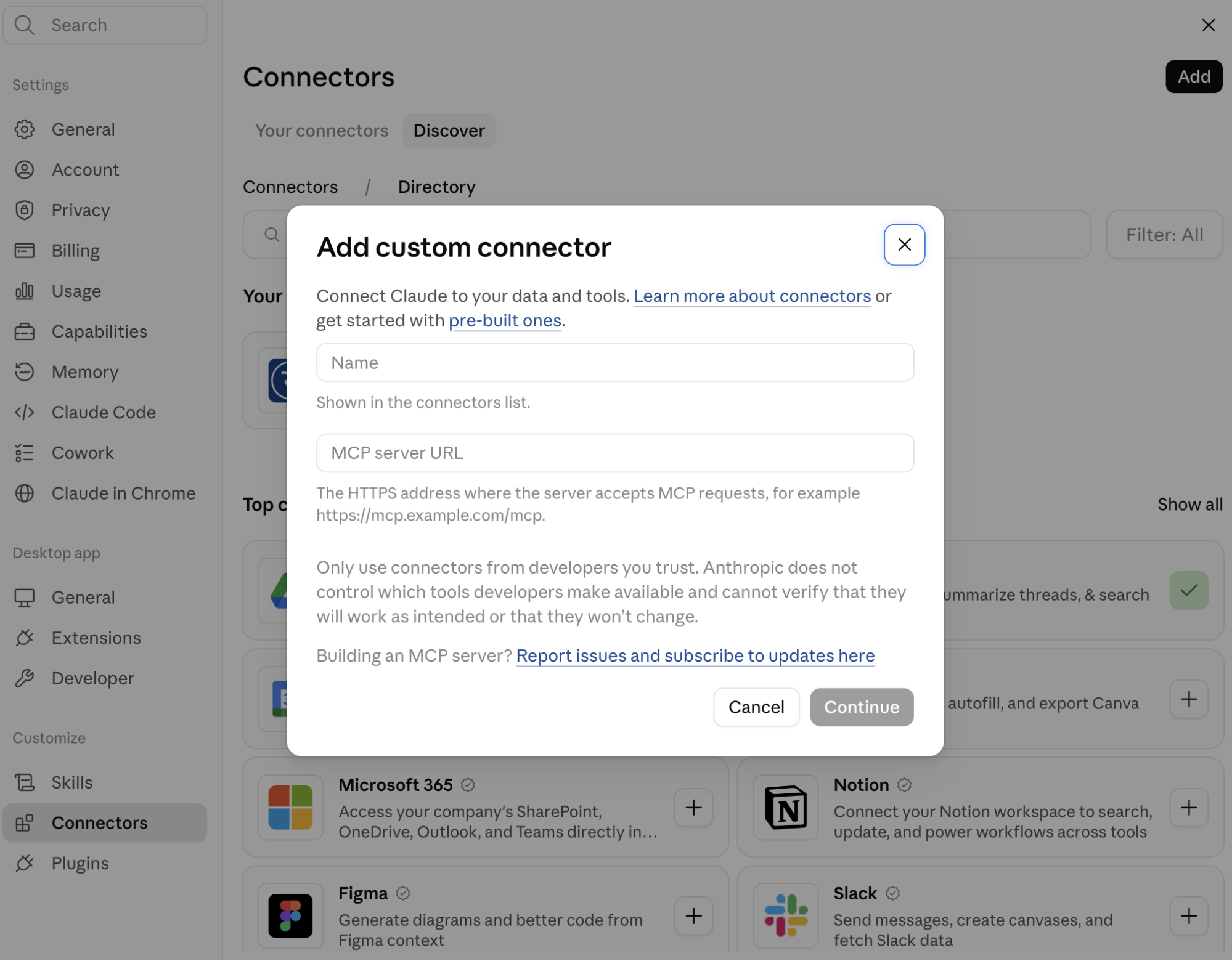
- In Claude, go to Customize > Connectors.
- Click + Add, then Add custom connector.
- Enter a name for the connector, such as ReachReport, and the remote MCP server URL
https://api.reachreport.io/mcp. Click Continue. - Keep the authentication settings Claude detects, click Continue, then Add.
- Sign in to ReachReport and approve access to your account.
Custom connectors are available on all Claude plans, but the Free plan is limited to one. On Team and Enterprise plans, an Owner first adds the connector in Organization settings > Connectors. Each member then finds it under Customize > Connectors and clicks Connect.
Once you’re connected, you can refer to your workspaces and reports by name in any chat.
PR Report Examples You Can Build With Claude
The examples below come from a demo workspace we built around two Dyson campaigns: the CameraJet launch, and the Dyson Unveiled event at IFA. The demo uses only public press coverage, ReachReport is not affiliated with Dyson in any way.
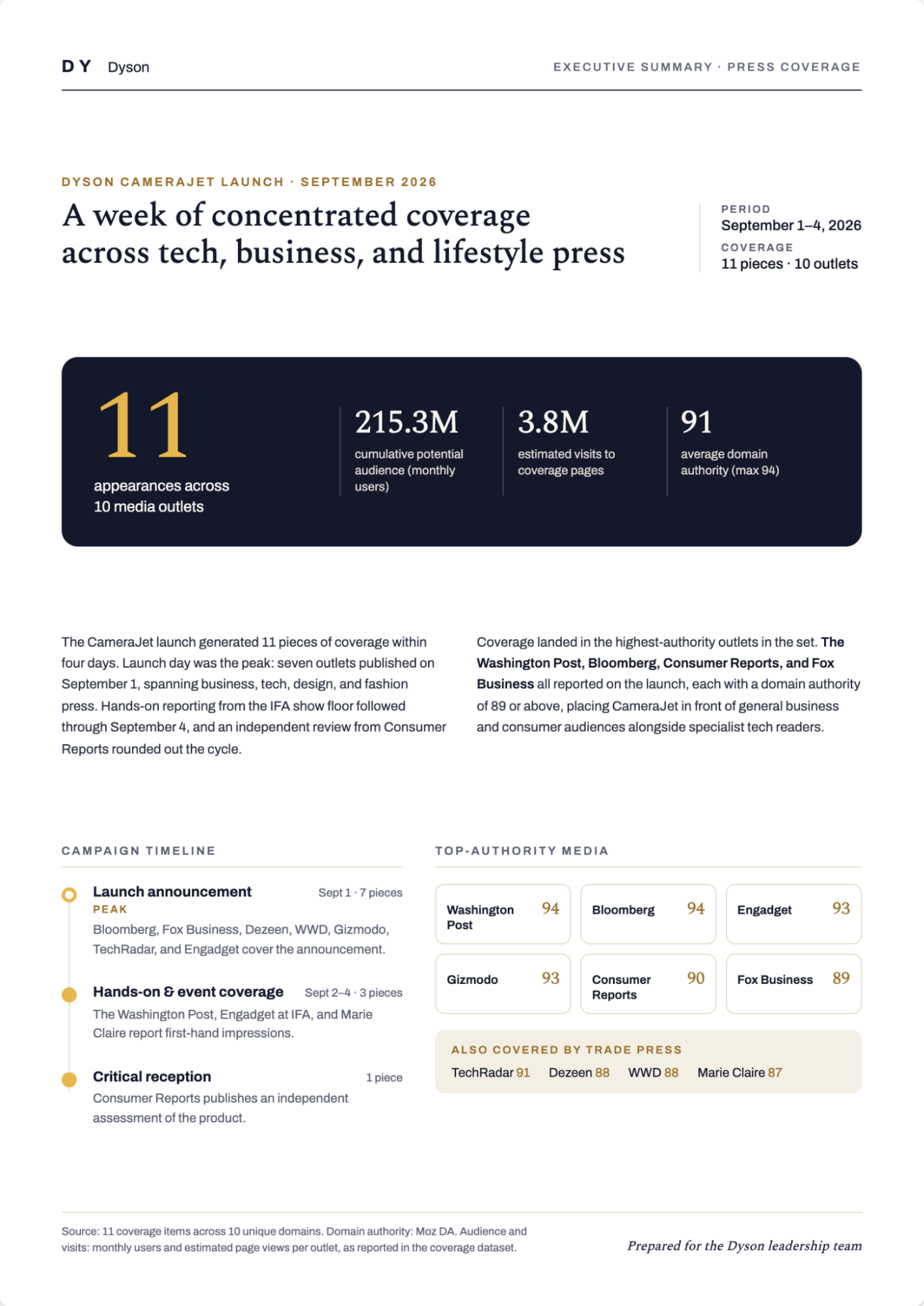
1. Executive Summary
Most clients, and especially busy executives, only want the highlights with the option to drill-down into the details. Claude can make a good draft of an executive summary that is based on campaign data in ReachReport. You can use the following prompt to create it. Replace the text in brackets with what you are looking for before running the prompt:
Look at my report "[report name]". Write a one-page executive summary for [client name or audience]: one headline sentence with the total views, [five] key takeaways, and a chart of views per article [and video]. Only use numbers from ReachReport, and tell me about anything you had to exclude.
2. Coverage Reports Per Outlet
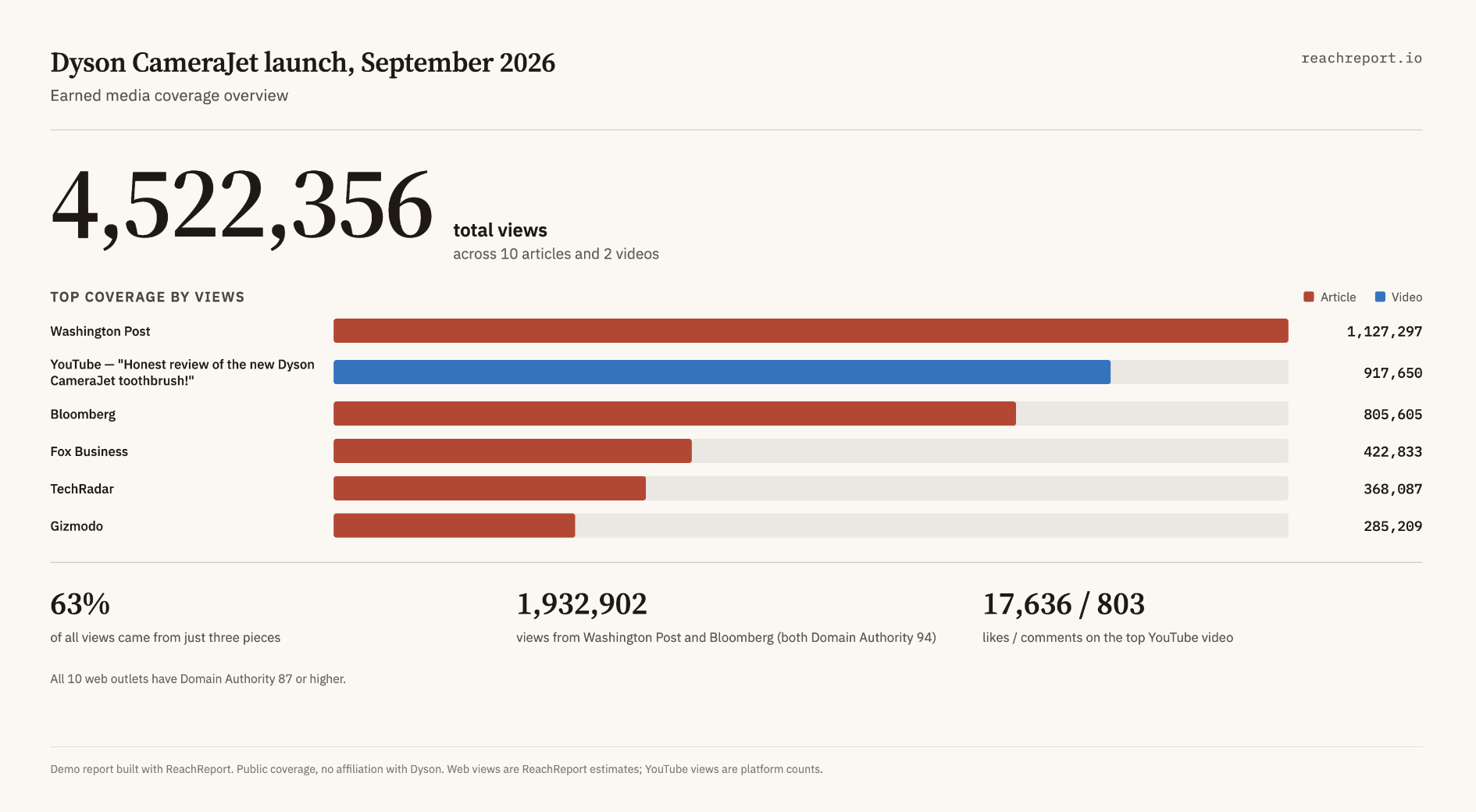
Standard reports group coverage by date, readership or views. However, sometimes a client wants it grouped a different way, or include different ROI metrics. Adapt and use the following prompt for that:
In my report "[report name]", group the coverage by [how you want to group it, for example outlet type, country, topic or campaign phase]: [list your groups, or write "choose sensible groups and explain them"]. Show views per group with the share of the total, and a table of everything underneath. Tell me how you decided which item goes in which group.

I also have my own metrics for this coverage: [describe your data, e.g. cost per placement, media value, conversions — paste it in or list it here]. Add these to the same table, matched by [article/outlet/date].
3. Year-Over-Year PR Result Comparison
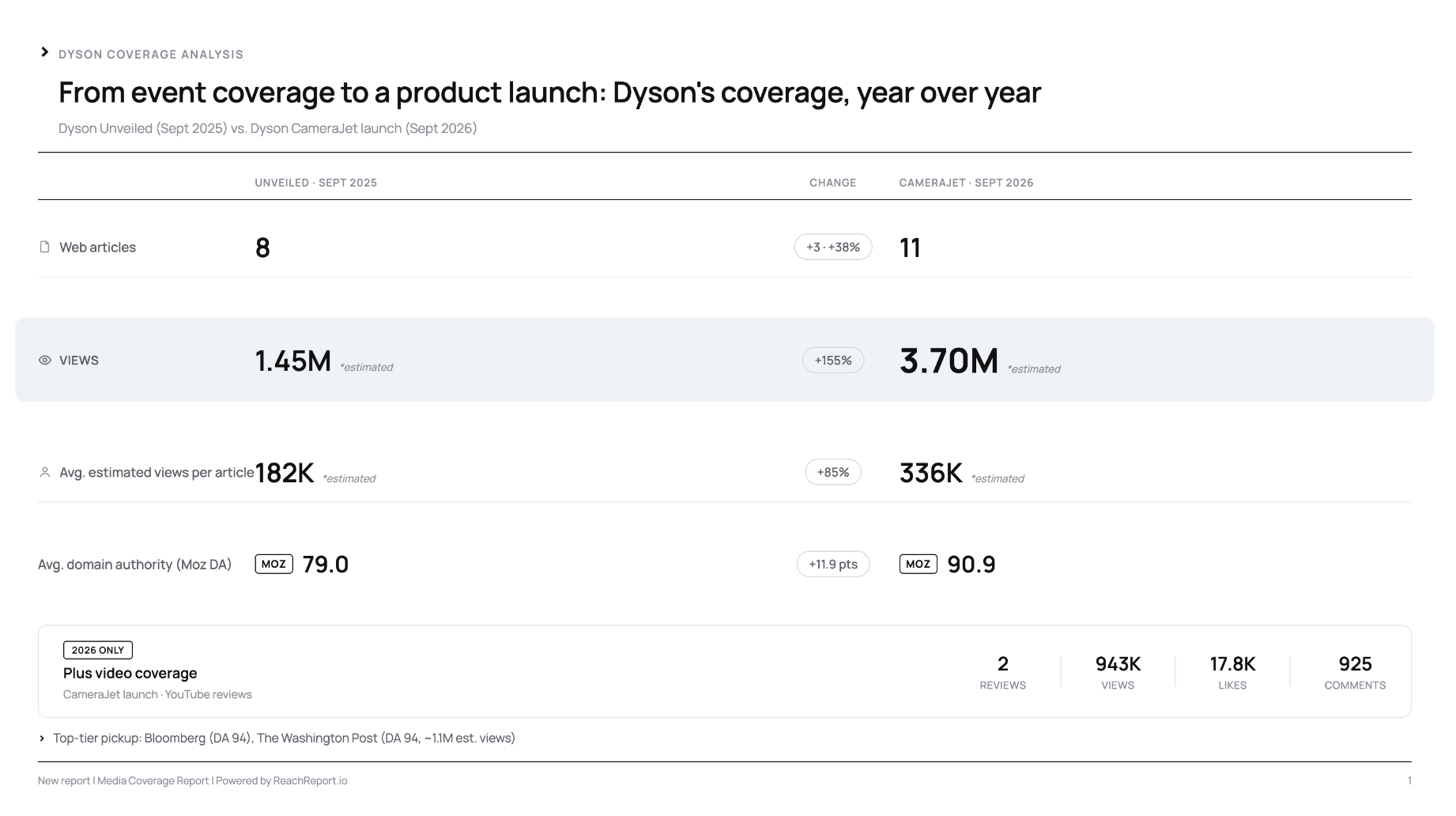
Before and after is age-old in advertising. Clients also love to evaluate progress by comparing PR results over different time periods. Adapt the following prompt to pull data from ReachReport and create a comparison:
Compare my reports "[earlier report name]" and "[later report name]". Show [articles, web views, average domain authority and social shares] for each, and the change between them. Point out anything that makes the comparison unfair, such as different campaign sizes, different time periods or missing data.
4. Monitor Newsletters for Brand Mentions
Industry newsletters are one of the coverage sources monitoring tools miss. Reading through 20 newsletters a day is time-consuming. It’s also easy to overlook a mention, especially on hectic days or after returning from a long weekend with a full inbox.
If your Claude account is also connected to your email you can track mentions automatically. You can instruct Claude to tell you if a client is mentioned and add the article to your ReachReport report.
Use the following prompt to do that:
Search my Gmail for newsletters from the last 7 days from [senders or label]. Look for mentions of [client name] and [campaign or product name]. For each mention, give me the newsletter name, date, the sentence where the client appears and the link to the article, if there is one. Don't send, reply, label or delete anything. For mentions that have a real article URL, propose adding them to my report "[report name]" and wait for my confirmation before adding anything.
5. Find Media Coverage You Might Be Missing
Your monitoring tool not only misses newsletters, it probably also won’t catch everything that is published online. Claude can act as a second pair of eyes and search the web for earned media that might be missing from a report, using the clips already in it as the guide:
These are the articles picked up by my monitoring tool that are currently in my report "[report name]". Look at the languages and publication dates of these articles, then search the web for coverage I'm missing from the same period, in the same languages plus [additional languages, e.g. German, French and Spanish]. Ignore the brand's own website, press releases, and syndicated copies. Give me a table with the URL, outlet, publication date, language, and why it's relevant. Don't add anything to the report until I confirm.
Try It
Try some of these things, or other reporting ideas that you have. Even if it is not directly useful, it will give you a better understanding of what is possible.
If you build a report your clients love, please tell us! We are also continuously learning.
Discover how easy PR Reporting can be with all data in one place.
You earned the results. We'll help you show them off. Experience automatic clipping, professional design, and smart automation.